1.
Remove the battery or AC adapter from Cyber-shot.
2. Confirm that the Memory Stick Duo media is still inserted in the
Cyber-shot.
| Warning: Memory Stick Pro / Memory Stick Pro Duo / CompactFlash card / MicroDrive and non-white (blue) MagicGate Memory Stick are not available for re-updating. |
3.
After 5 seconds, power up the Cyber-shot by reconnecting the AC adapter.
4. Red Memory Stick Access lamp will turn on when the
"re-updating" process starts.
NOTE:
During this re-updating procedure, there are no indicators
on the LCD screen.
5. Red Memory Stick Access light will turn off automatically
approximately 2.0 minutes later. (This means the re-updating process is
completed.)
This
operation is successfully completed.
After the Firmware Update Utility is successfully downloaded into the
camera, please turn off the camera.
To
complete the firmware update, push the RESET button using a
sharp-pointed object.
Note:
During this reset, the camera must be in OFF mode.
In
this Reset, please note that following functions will be reset as default:
Volume, Beep, Metering Mode, White Balance, ISO, Picture Effect, Sharpness,
Saturation, Contrast, Scene Selection, EV, AF Range Finder Frame, Multi
Burst Shutter Interval, AF Mode, Digital Zoom, AF Illuminator, BRK (Bracket
Step), Macro Mode, Flash Mode, Slide (Interval, Image, Repeat), OSD On/Off,
Histogram On/Off, LCD Backlight On/Off, Picture Quality, Image Size, Camera
Mode, Date/Time, Control Button Position, Flash Level, Red Eye Reduction and
USB Connect.
|
If any error occurs, please refer to the following for any corresponding Solution. |
|
If the access lamp of Memory Stick blinks during the re-update, or the access lamp does not turn off after 3 minutes, a failure may have occurred with the Cyber-shot camera or Memory Stick media. Please contact a local Sony Service Centre for repair options. |
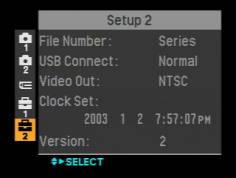
To
check the version of the Cyber-shot, please following the steps below or
refer to Step
8.
1.
Turn the mode-SW to SET UP.
2. Press and hold on to the Menu button and turn ON the
Cyber-shot.
3. Select Setup 2, at camera screen.
4. Confirm the version listed is 2, at the Setup 2 screen.